Skip to content

Desi banjara

learn and grow together

  • Azure
    • Azure Compute
      • Azure Logic Apps
      • Azure Mobile Apps
      • Azure App Service
      • Azure Serverless Computing
        • Azure Functions
    • Azure Networking services
      • Azure Networking – VNET
    • Azure Database Services
      • Azure SQL
      • Azure Data Factory
      • Azure Databricks
    • Azure Analytics Services
    • Azure Cognitive Services
    • Azure Data and Storage
    • Azure Devops
    • Azure landing zone
    • Azure IaaS
    • Azure Internet of Things (IoT)
      • Azure Machine Learning
      • Azure AI and ML services
    • Azure Migration
    • Microsoft Azure Log Analytics
  • Azure Security
    • Azure Identity and Access Management
    • Azure Active Directory
    • Azure Defender
    • Azure security tools for logging and monitoring
    • Azure Sentinel
    • Azure Sentinel – Data connectors
  • Agile Software development
    • Atlassian Jira
  • Amazon Web Services (AWS)
    • Amazon EC2
    • Amazon ECS
    • AWS Lambda
  • Google
    • Google Cloud Platform (GCP)
    • gmail api
    • Google Ads
    • Google AdSense
    • Google Analytics
    • Google Docs
    • Google Drive
    • Google Maps
    • Google search console
  • Software architecture
    • Service-oriented architecture (SOA)
    • Domain-Driven Design (DDD)
    • Microservices
    • Event-Driven Architecture
    • Command Query Responsibility Segregation (CQRS) Pattern
    • Layered Pattern
    • Model-View-Controller (MVC) Pattern
    • Hexagonal Architecture Pattern
    • Peer-to-Peer (P2P) pattern
    • Pipeline Pattern
  • Enterprise application architecture
  • IT/Software development
    • API development
    • ASP.Net MVC
    • ASP.NET Web API
    • C# development
    • RESTful APIs
  • Cybersecurity
    • Cross Site Scripting (XSS)
    • Reflected XSS
    • DOM-based XSS
    • Stored XSS attacks
    • Ransomware
    • cyber breaches
    • Static Application Security Testing (SAST)
  • Interview questions
    • Microsoft Azure Interview Questions
    • Amazon Web Services (AWS) Interview Questions
    • Agile Software development interview questions
    • C# interview questions with answers
    • Google analytics interview questions with answers
    • Javascript interview questions with answers
    • Python interview questions with answers
    • WordPress developer interview questions and answers
  • Cloud
    • Cloud computing
    • Infrastructure as a Service (IaaS)
    • Platform as a Service (PaaS)
    • Software as a Service (SaaS)
    • Zero Trust strategy
  • Toggle search form
  • Azure Resource Manager Azure
  • Azure Resource Groups Azure
  • TinyMCE – Rich Text Editor Rich Text Editor
  • How to make your work meetings more productive? Agile Software development
  • Azure Security Information and Event Management (SIEM) Azure Security Information and Event Management (SIEM)
  • How to build high performing teams? Project management
  • How to send outlook email to Microsoft Teams channel? Microsoft Teams
  • Google search console Google search console

ASP.NET Core – How to show total number of users in each country on google map?

Posted on March 24, 2023March 24, 2023 By DesiBanjara No Comments on ASP.NET Core – How to show total number of users in each country on google map?

To show the total number of users in each country on Google Maps using ASP.NET Core, you can follow these general steps:

  1. Collect the user data, including the country information for each user, from your database or another source. You can use LINQ to group the users by country and count the number of users in each group. For example:

    LINQ query to group the users by country

    This will create a list of objects with two properties: Country, which contains the country name, and Count, which contains the number of users in that country.

  2. Load the Google Maps JavaScript API in your view or layout file. You can do this by adding the following code to the <head> section of your HTML:
    <script async defer
    src="https://maps.googleapis.com/maps/api/js?key=YOUR_API_KEY&callback=initMap">

    </script>


    Be sure to replace YOUR_API_KEY with your own Google Maps API key.

  3. Create a JavaScript function to initialize the map and add markers for each country. You can use the geocode() method of the Google Maps API to convert the country names to latitude and longitude coordinates. For example:
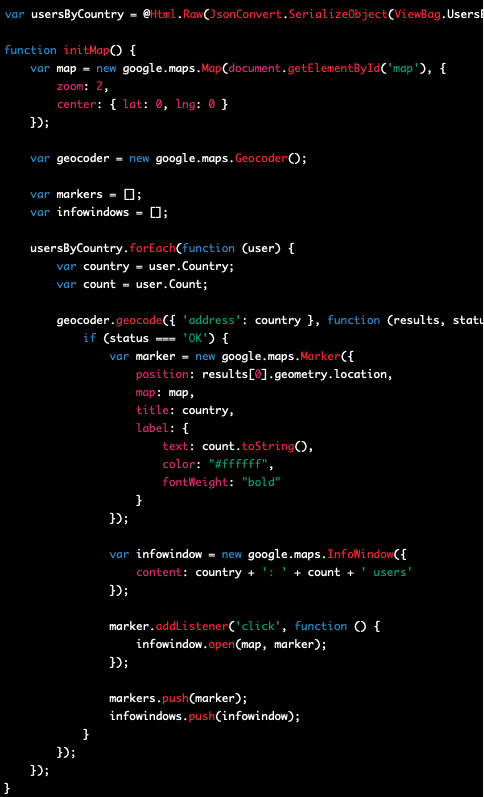
    Google map marker to display the count on the pin

    This code uses a foreach loop to iterate through the list of countries and create a marker for each one. It also uses an InfoWindow to display the country name and number of users when the user clicks on the marker.

    Also in this code, we’ve added a label property to the marker object, which is an object that contains the text that should be displayed on the marker, as well as its color and font weight. We’ve set the text to be the count, and converted it to a string using the toString() method. It will look like below image.
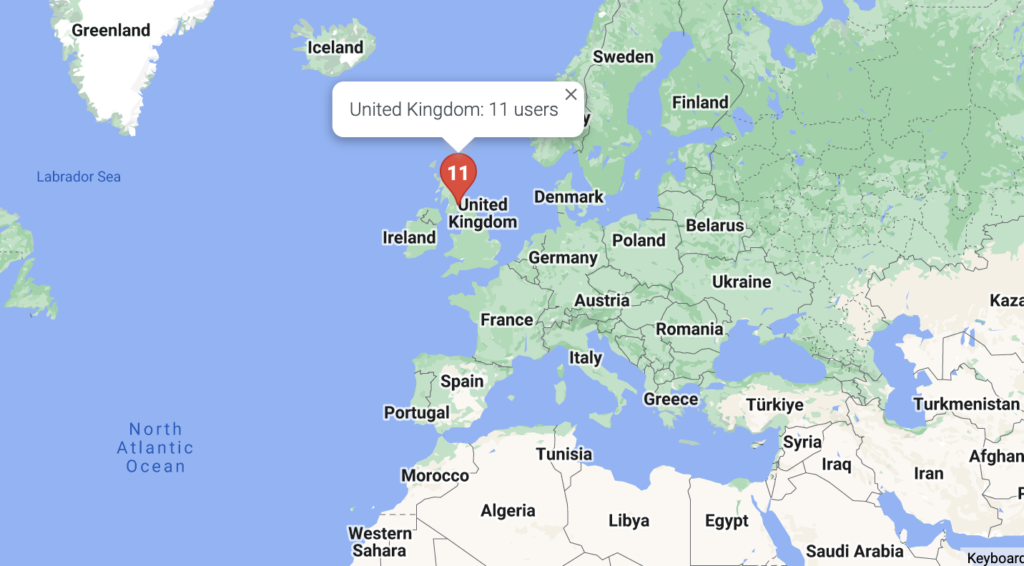
    Google map - Marker with count on pin

  4. Add a <div> element to your HTML where the map will be displayed, and set its height and width. For example:
    <div id="map" style="height: 500px; width: 100%;"></div>

    This will create a full-width map with a height of 500 pixels.

  5. Finally, make sure to call the initMap() function when the page loads, by adding the following code to the bottom of your view:
    <script>
       $(document).ready(function () {
           initMap();
       });
    </script>

    This code uses jQuery to call the initMap() function after the page has finished loading.

And that’s it! When you load the page, you should see a map with markers for each country, and when you click on a marker, you should see an info window displaying the country name and number of users.

ASP.NET Core, ASP.Net MVC, C# development, Google, Google Maps Tags:ASP.NET core, Google Maps, Google Maps JavaScript API, InfoWindow, initMap, LINQ

Post navigation

Previous Post: Add Google Maps in ASP.NET core web application
Next Post: WordPress – How to switch to Block Editor

Related Posts

  • What is the Google Flights API? Google
  • ASP.NET MVC – Differences between DisplayName and Display Attributes ASP.NET Core
  • How can I run web and api projects together in visual studio ASP.NET Core
  • Google Docs Google
  • How to make API call to invite user and keep user on same page but change button title to invited? ASP.NET Core
  • Deploy ASP.NET Core apps to Azure App Service ASP.NET Core

Leave a Reply Cancel reply

Your email address will not be published. Required fields are marked *

This site uses Akismet to reduce spam. Learn how your comment data is processed.


Categories

  • Agile Software development
  • AI Writing & Automation
  • Amazon EC2
  • Amazon Web Services (AWS)
  • Apache Kafka
  • API development
  • Apple Mac
  • ARM templates
  • Artificial intelligence
  • ASP.NET Core
  • ASP.Net MVC
  • Atlassian Jira
  • AWS Lambda
  • Azure
  • Azure Active Directory
  • Azure AD B2C
  • Azure AD Domain Services
  • Azure AI and ML services
  • Azure Analytics Services
  • Azure App Service
  • Azure Application Gateway
  • Azure Archive Storage
  • Azure Blob Storage
  • Azure Cache for Redis
  • Azure Cognitive Services
  • Azure Compute
  • Azure Container Instances (ACI)
  • Azure Core Services
  • Azure Cosmos DB
  • Azure Data and Storage
  • Azure Data Factory
  • Azure Data Lake Storage
  • Azure Database for MySQL
  • Azure Database for PostgreSQL
  • Azure Database Migration Service
  • Azure Database Services
  • Azure Databricks
  • Azure DDoS Protection
  • Azure Defender
  • Azure Devops
  • Azure Disk Storage
  • Azure ExpressRoute
  • Azure File Storage
  • Azure Firewall
  • Azure Functions
  • Azure HDInsight
  • Azure IaaS
  • Azure Identity and Access Management
  • Azure Internet of Things (IoT)
  • Azure Key Vault
  • Azure Kubernetes Service (AKS)
  • Azure landing zone
  • Azure Lighthouse
  • Azure Load Balancer
  • Azure Logic Apps
  • Azure Machine Learning
  • Azure Machine Learning
  • Azure Migration
  • Azure Mobile Apps
  • Azure Network Watcher
  • Azure Networking – VNET
  • Azure Networking services
  • Azure Pricing and Support
  • Azure Queue Storage
  • Azure Resource Manager
  • Azure Security
  • Azure Security Center
  • Azure Security Information and Event Management (SIEM)
  • Azure security tools for logging and monitoring
  • Azure Security, Privacy, Compliance, and Trust
  • Azure Sentinel
  • Azure Sentinel – Data connectors
  • Azure Serverless Computing
  • Azure Service Level Agreement (SLA)
  • Azure SLA calculation
  • Azure SQL
  • Azure SQL Database
  • Azure Storage
  • Azure Stream Analytics
  • Azure Synapse Analytics
  • Azure Table Storage
  • Azure Virtual Machine
  • Azure VPN Gateway
  • Blogging
  • Business
  • C# development
  • CDA (Clinical Document Architecture)
  • ChatGPT
  • CI/CD pipeline
  • Cloud
  • Cloud computing
  • Cloud Computing Concepts
  • Cloud FinOps
  • Cloud FinOps Optmisation
  • Cloud services
  • COBIT
  • Command Query Responsibility Segregation (CQRS) Pattern
  • Configure SSL offloading
  • Content Creation
  • Content management system
  • Continuous Integration
  • conversational AI
  • Cross Site Scripting (XSS)
  • cyber breaches
  • Cybersecurity
  • Data Analysis
  • Data Clean Rooms
  • Data Engineering
  • Data Warehouse
  • Database
  • DeepSeek AI
  • DevOps
  • DevSecOps
  • Docker
  • DOM-based XSS
  • Domain-Driven Design (DDD)
  • Dynamic Application Security Testing (DAST)
  • Enterprise application architecture
  • Event-Driven Architecture
  • git
  • gmail api
  • Google
  • Google Ads
  • Google AdSense
  • Google Analytics
  • Google Cloud Platform (GCP)
  • Google Docs
  • Google Drive
  • Google Flights API
  • Google Maps
  • Google search console
  • Healthcare Interoperability Resources
  • Hexagonal Architecture Pattern
  • IBM qradar
  • Internet of Things (IoT)
  • Interview questions
  • Introduction to DICOM
  • IT governance
  • IT Infrastructure networking
  • Kubernetes
  • Layered Pattern
  • Load Balancing Algorithms
  • Microservices
  • Microservices
  • Microsoft
  • Microsoft 365 Defender
  • Microsoft AZ-900 Certification Exam
  • Microsoft Azure
  • Microsoft Azure Log Analytics
  • Microsoft Cloud Adoption Framework
  • Microsoft Teams
  • Microsoft Teams
  • Model-View-Controller (MVC) Pattern
  • Monitoring and analytics
  • NoSQL
  • OpenAI
  • Peer-to-Peer (P2P) pattern
  • Pipeline Pattern
  • PL-100: Microsoft Power Platform App Maker
  • Postman
  • Project management
  • Rally software
  • Ransomware
  • Reflected XSS
  • RESTful APIs
  • Rich Text Editor
  • SC-100: Microsoft Cybersecurity Architect
  • Scrum Master Certification
  • Service-oriented architecture (SOA)
  • SIEM
  • Software architecture
  • Splunk
  • SQL
  • Static Application Security Testing (SAST)
  • Stored XSS attacks
  • System Design Interview
  • Test Driven Development (TDD)
  • TinyMCE
  • Top technology trends for 2023
  • Uncategorized
  • User Experience (UX) design
  • Version control system
  • virtual machine scale set
  • visual studio
  • Web development
  • Windows Hello
  • WordPress
  • WordPress developer interview questions and answers
  • Zero Trust strategy


Recent Posts

  • Ace Your FAANG System Design Interview like Google & Amazon: The 8 Whitepapers You Must Read
  • From $0 to $10K/Month Writing Online – The Exact Roadmap to Build a Profitable Writing Career
  • How to Write an AI-Generated Article That Feels 100% Human Using ChatGPT
  • DeepSeek AI: The OpenAI Rival You Didn’t See Coming (But Should)
  • 10 Ways AI is Revolutionizing Healthcare (And Why Your Doctor Might Just Be a Robot Soon)
  • What is Data Clean Room and How Do Data Clean Rooms Work? Data Clean Rooms
  • Google Analytics Google Analytics
  • Configure SSL offloading with Azure Load Balancer Azure Load Balancer
  • Cross Site Scripting (XSS) Cross Site Scripting (XSS)
  • Azure Load Balancer Azure
  • Azure security tools for logging and monitoring Azure security tools for logging and monitoring
  • Get started with Azure Kubernetes Service (AKS) Azure Kubernetes Service (AKS)
  • Azure Artificial Intelligence (AI) and Machine Learning (ML) services Azure

Copyright © 2025 Desi banjara.

Powered by PressBook News WordPress theme